
CapCut video editor online transforms the way content creators, digital marketers, and educators produce video content. The platform runs entirely inside a web browser and requires zero software installation. From basic clip trimming to sophisticated AI avatar generation, CapCut delivers professional-grade editing tools inside an accessible, largely free interface. This guide covers every major feature of the CapCut online editor and explains exactly how each tool serves modern video creators.
What Is CapCut Video Editor Online?
CapCut is a cloud-based video editing platform developed by ByteDance. The online version operates directly inside any modern web browser, with all project data saved automatically to the cloud. Creators access their projects from any internet-connected device without version conflicts or storage limitations on local hardware.
The platform serves two distinct user groups. Beginners benefit from drag-and-drop simplicity, pre-built templates, and one-click AI enhancements. Advanced editors gain access to multi-track timelines, keyframe animation, speed curves, and a full AI-powered editing toolkit. The free tier covers most essential features, while the Pro subscription unlocks premium assets and exclusive AI tools.
Core Video Editing Features
Multi-Track Timeline Editor
The multi-track timeline editor forms the operational core of CapCut’s online workspace. Editors stack video clips, audio tracks, text overlays, and sticker animations across separate lanes. Each track supports independent trimming, splitting, and repositioning. Magnetic snapping automatically aligns clip boundaries for precise cuts without manual adjustment.
Speed Controls and Curve Editor
CapCut supports both uniform speed adjustment and curve-based ramping on individual clips. The curve editor lets different sections of the same clip accelerate or decelerate independently, producing the dramatic speed ramp effects common in cinematic and social media content. Slow-motion sequences and hyperlapse-style fast-forwards both operate within the same curve interface.
Transitions and Visual Effects
The platform provides hundreds of video transitions sorted by style — glitch cuts, zoom bursts, smooth wipes, spin transitions, and cinematic fades. Each transition previews before application and accepts duration adjustments. The visual effects library adds non-destructive overlays including VHS textures, light leaks, cinematic color grades, and bokeh animations. Stacking multiple effects on the same clip remains possible without degrading the source footage.
All AI-Powered Features in CapCut Online
CapCut separates itself from competing online video editors through its expanding collection of machine-learning tools. These features automate repetitive tasks and introduce creative capabilities that previously required dedicated software or production teams.
AI Avatar Generator
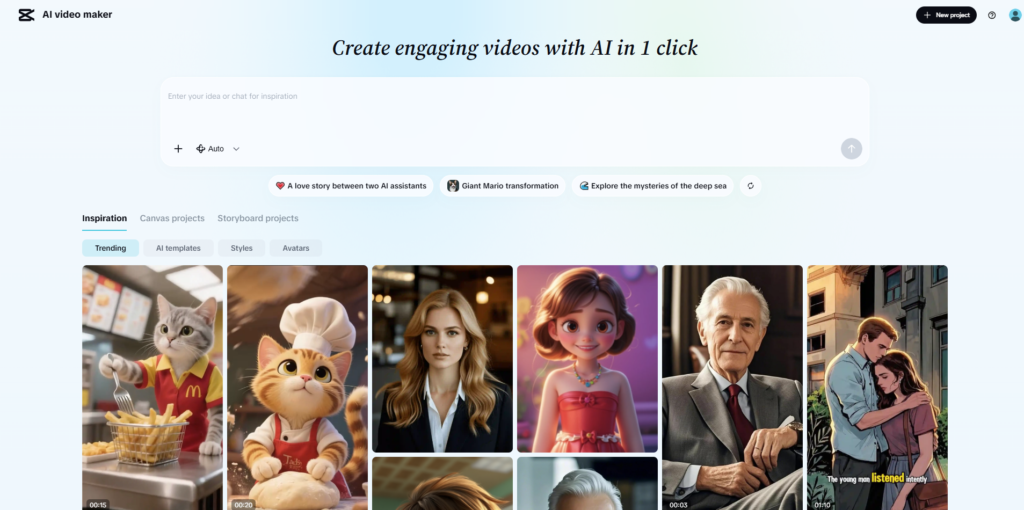
The AI avatar generator ranks as CapCut’s most distinctive feature. The tool produces realistic digital human avatars that deliver scripted content using synthesized voice and animated facial expressions — no camera or microphone required. Creators choose from photorealistic human avatars, stylized 3D characters, and animated personas.
The workflow operates in three steps: the creator writes or generates a script, selects an avatar, and the system renders a complete talking-head video. The AI avatar creation tool supports multilingual voice synthesis, meaning the same avatar delivers content in different languages with consistent pronunciation quality and natural pacing. Avatar customization options cover clothing style, background environment, and facial appearance adjustments within the available parameters.
This feature benefits product marketers, e-learning developers, and corporate training teams who need consistent on-screen narration without scheduling talent or renting studios.
AI Text-to-Video
The text-to-video feature converts written prompts into generated video clips. Creators describe a scene or concept in text, and the AI model produces a matching visual sequence. The tool works effectively for b-roll generation, background footage creation, and concept visualization in pitch decks or explainer videos.
Auto Captions and Speech-to-Text
The auto captions feature applies speech recognition to video audio and places synchronized subtitle overlays directly on the timeline. The system handles multiple languages and delivers high accuracy on clearly recorded dialogue. Editors modify individual words, restyle caption typography, and reposition text blocks after generation. This feature cuts subtitle production time significantly and improves content accessibility for hearing-impaired viewers.
AI Background Remover
The AI background remover separates on-screen subjects from their backgrounds without requiring a green screen setup. The model handles hair, fine edges, and complex subject outlines with solid precision. After removal, editors replace the original background with a solid color fill, a new image, or a replacement video scene. Manual masking adjustments remain available for frames where automatic detection produces imperfect results.
AI Script Generator
The AI script generator produces structured video scripts based on a topic, desired tone, and target duration. The output suits voiceover recording, avatar narration, or direct-to-camera delivery. The feature connects directly with the avatar generator, creating a complete pipeline from text brief to finished avatar-narrated video without switching platforms.
AI Image Generator
CapCut includes an AI image generator that produces original visuals from text descriptions. Creators use generated images as thumbnail backgrounds, title card artwork, or scene-setting visuals within the video timeline. Output styles range from photorealistic to illustrated and abstract.
Media Management and Asset Library
Stock Media Library
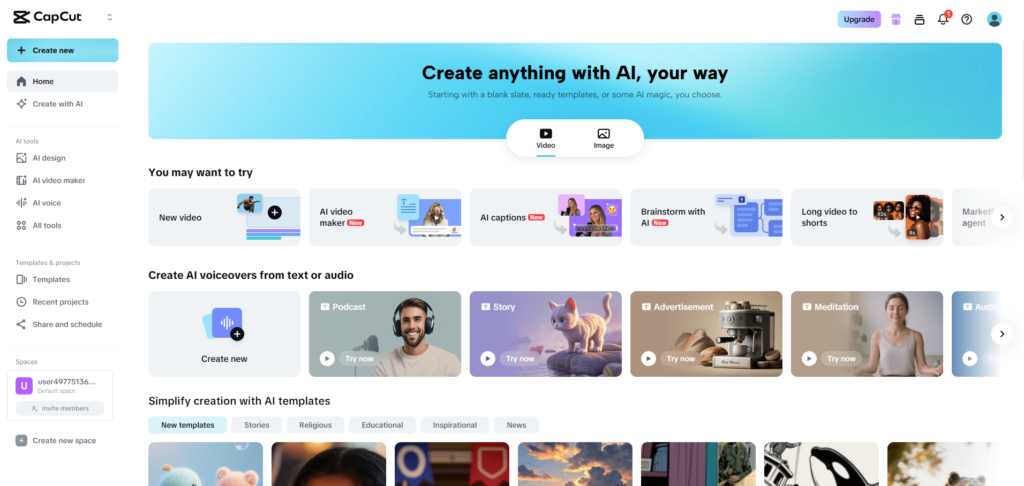
CapCut integrates a built-in stock media library containing millions of royalty-free video clips, music tracks, and sound effects. Creators search by keyword, filter by duration or mood, and drag assets directly onto the timeline. The licensed music library spans genres including upbeat, cinematic, lo-fi, ambient, and trending audio formats matched to popular social media content styles.
CapCut Templates
The CapCut templates library offers thousands of pre-designed video formats covering promotional content, travel reels, product showcases, birthday videos, and tutorial formats. Each template contains pre-timed text placeholders, transitions, and background music. Editors swap placeholder media for their own footage to produce a complete, polished video in minutes. The template catalog updates regularly to reflect trending styles on TikTok and Instagram Reels.
Text, Typography, and Animated Titles
The typography toolkit provides hundreds of font options, animated text presets, and kinetic title styles. Editors control font size, color, opacity, outline weight, shadow depth, and background fill independently per text element. Animated text presets assign entrance and exit animations automatically, enabling dynamic opening titles without manual keyframe setup.
Export Options and Publishing
CapCut supports video export in 480p, 720p, 1080p, and 4K resolutions with frame rate options of 24, 25, 30, and 60 fps. Export formats include MP4, MOV, and GIF. Creators select the video aspect ratio during export — 16:9 for YouTube, 9:16 for TikTok and Reels, 1:1 for Instagram grid posts, and 4:5 for portrait formats. Direct TikTok publishing connects through account authorization and enables one-click upload from inside the editor.
Collaboration and Team Workspace
The CapCut team workspace allows multiple editors to share project folders, asset libraries, and brand kits. Agencies and brand marketing teams use this feature to maintain consistent visual identity across content produced by different team members. Shared templates enforce approved fonts, colors, and logo placements. Role-based access controls let administrators restrict editing permissions on sensitive or finalized projects.
How CapCut Compares to Other Online Video Editors
Among competing online video editing tools, CapCut maintains several clear advantages. Adobe Express integrates better with the broader Adobe ecosystem but restricts most AI features to paid tiers. Canva Video excels at design asset variety but lacks CapCut's deep timeline controls and AI avatar capabilities. Clipchamp connects smoothly with Microsoft 365 but does not match CapCut's breadth of AI automation. CapCut's combination of a free tier, AI avatar generation, auto captions, background removal, text-to-video, and a regularly refreshed template library inside a single browser environment makes it a well-rounded choice for creators who prioritize both production speed and output quality.
Who Benefits Most from CapCut Video Editor Online?
Social media content creators who produce short-form video for TikTok, Instagram Reels, or YouTube Shorts gain immediate value from CapCut's template library and trending audio integration. Digital marketers who produce consistent branded video at scale benefit from the team workspace, brand kit management, and the AI script-to-avatar pipeline. Educators and course creators reduce production costs significantly through auto captions, the AI avatar generator, and text-to-video tools. Small businesses that lack production crews use CapCut to create promotional content, product demonstrations, and social ads independently without outsourcing.
Conclusion
CapCut video editor online covers the entire video production workflow — from raw footage assembly through AI-generated avatar narration to direct social media publishing — inside a single browser-based platform. Its AI avatar generator, auto captions, background remover, text-to-video engine, and template library collectively reduce production time and lower the technical barrier for creators at every skill level. The platform continues expanding its AI-powered editing capabilities at a pace that outpaces most competing browser-based tools. For creators who need speed, accessibility, and professional output quality, CapCut remains a top-tier online video editing solutions.
About the Author